
Microservice Architecture Explained with an Online Shopping Example
What microservices are, how they differ from a monolith, how services talk to each other, monorepo vs polyrepo, API gateways and how it all gets deployed.
Microservice architecture is one of those topics that comes up in almost every senior backend interview, and in a lot of real projects too. The idea is simple: instead of building one big application, you build many small services and manage each one separately.
In this post I'll walk through it using an online shopping website, the same example I used in my own notes when I was learning it.
The big picture
Here's what a small microservice setup looks like.
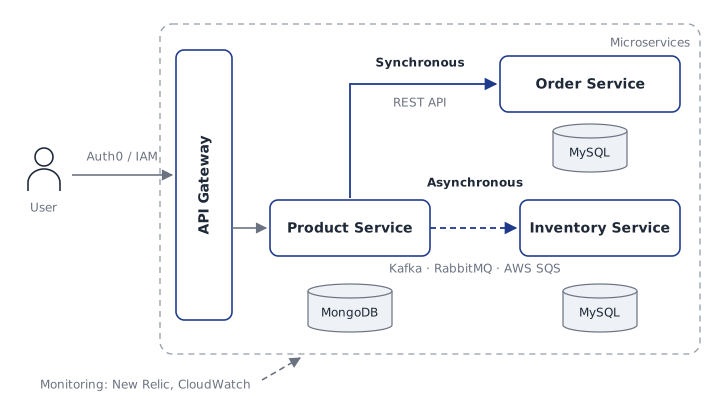
- The user logs in through an identity provider like Auth0 or AWS IAM.
- Every request goes through the API Gateway first.
- Each service owns its own database. Product Management uses MongoDB, while Order and Inventory use MySQL.
- Product talks to Order synchronously over a REST API, and to Inventory asynchronously through a message broker like Kafka, RabbitMQ or AWS SQS.
- Tools like New Relic or CloudWatch monitor all the services.
To see why this is useful, let's start with the opposite: the monolith.
Monolith architecture
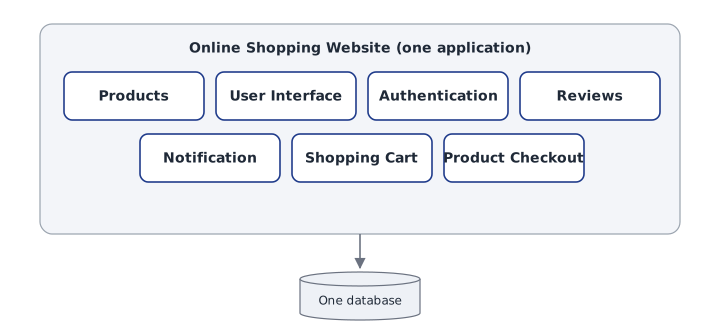
In a monolith, the whole application is one unit. For an online shopping website, products, the user interface, authentication, reviews, notifications, the shopping cart and checkout all live in the same codebase and share one database.
Inside, a monolith is usually split into layers, but they're still deployed together.
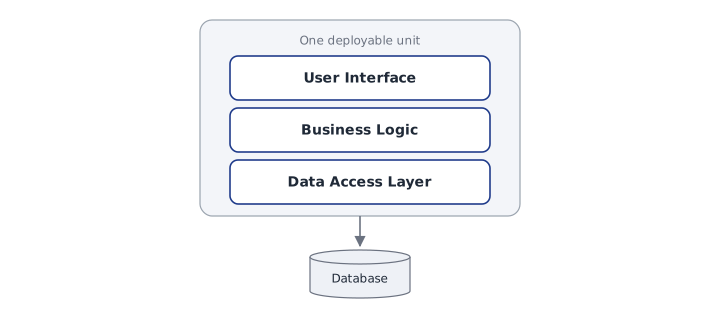
What this means in practice:
- It's one unit written in one language.
- A change to one feature can affect others.
- The entire codebase has to build, even for a one-line change.
- It's developed, deployed and scaled as one unit.
That's fine for small apps. But as the app grows, the problems start to show:
- Complexity gets high.
- Scaling is hard. If only checkout gets heavy traffic, you still have to scale the whole app.
- You're stuck with shared dependencies, like one language version for everything.
- Testing is difficult, because everything is connected.
- The CI/CD process is slow and painful.
- One bug can take down the entire application.
Microservice architecture
In a monolith, we develop, test, deploy and scale everything as one unit. In microservice architecture, we split the software into small services, and develop, test and deploy each one separately.
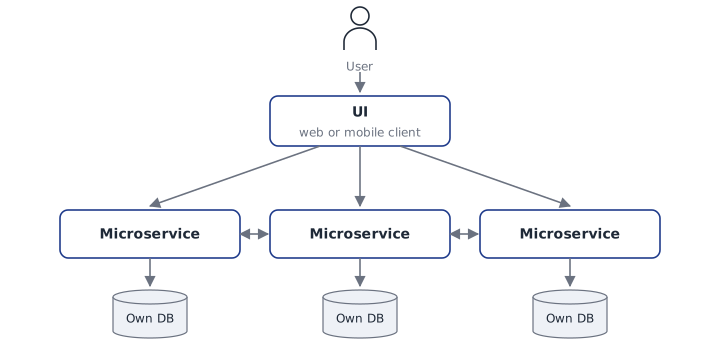
Here's the same shopping website as microservices:
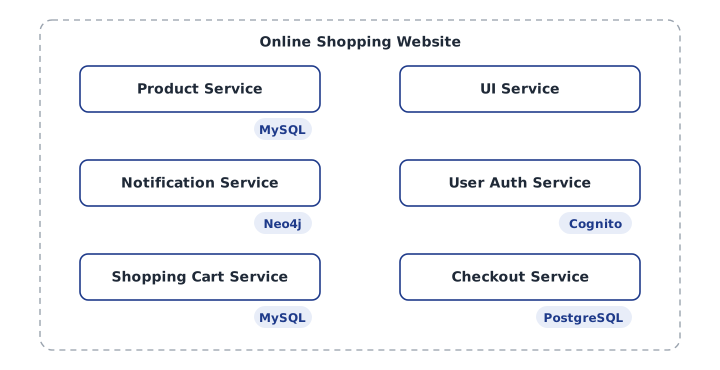
Each service picks the data store that fits its job. Product and Shopping Cart use MySQL, Checkout uses PostgreSQL, Notification uses Neo4j, and User Auth uses AWS Cognito.
Loose coupling
The key idea is loose coupling. In a monolith, services are tightly coupled, which means one part depends directly on another. In microservices, each service runs on its own and only talks to others through well-defined APIs.
Split by business logic, not by technology
When you break an application into services, think about business capabilities, not technical layers. "Checkout" is a good service. "Database layer" is not.
This also changes how teams work. Each service can have its own team and even its own language:
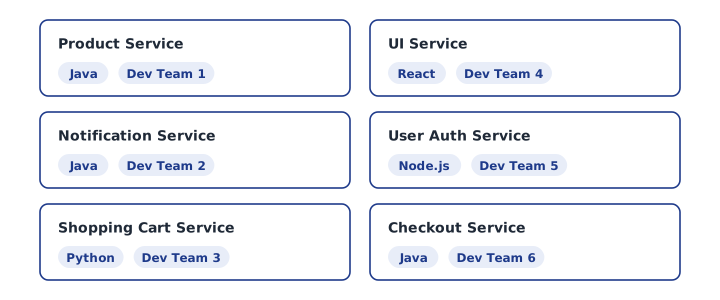
So in microservices:
- Services are separated by business logic.
- One service handles one function.
- One team owns one service.
- Services can use different languages.
- Services are independent.
- Each one is developed, deployed and scaled independently.
How microservices communicate
Services need to talk to each other, and there are two ways to do it.
Synchronous communication
Synchronous communication happens through HTTP requests and responses. Each service exposes its own API endpoints, and other services call them.

The catch is the waiting period. Once a service sends a request, it waits until the response comes back. If the other service is slow or down, the caller is stuck too.
Asynchronous communication
To avoid that waiting, services can communicate asynchronously through a message broker.
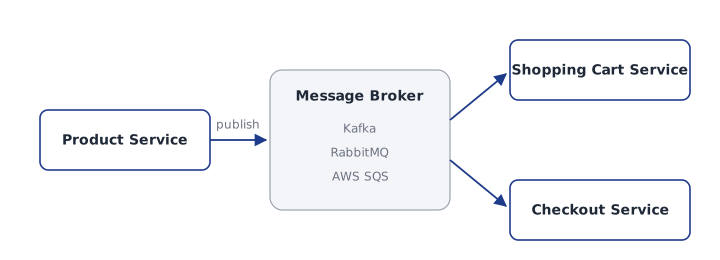
One service sends a message to the broker. The broker delivers it to the services that need it. If those services need to reply, they send their response back through the broker too. The sender doesn't sit and wait, so there's no waiting period.
A simple rule I use: if the caller needs the answer right now to continue (like checking a price before checkout), use a synchronous call. If it's something that can happen in the background (like updating inventory or sending an email), use a message broker.
Disadvantages of microservices
Microservices aren't free. Before choosing them, know the trade-offs:
- Complexity is high. You're running many apps instead of one.
- Communication between services is complex. Network calls fail, and you have to handle that.
- Monitoring is harder. One user request can touch five services.
- You need strong project management to coordinate many teams and releases.
For a small product or an early startup, a well-structured monolith is often the better start.
Code management: monorepo vs polyrepo
Once you have many services, you need to decide where the code lives.
Monorepo
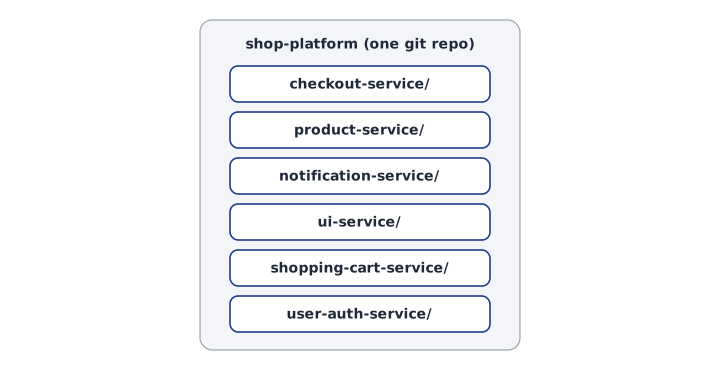
A monorepo keeps all services in one git repo, each in its own folder.
Advantages
- All the code is in one place.
- Code management is easy.
- Sharing code, like common libraries, is easy.
Disadvantages
- It can lead to tight coupling between services.
- Cloning, merging and pushing get slow as the repo grows.
- One mistake can affect the whole project.
- CI/CD is harder, because you need to work out which services actually changed.
Polyrepo
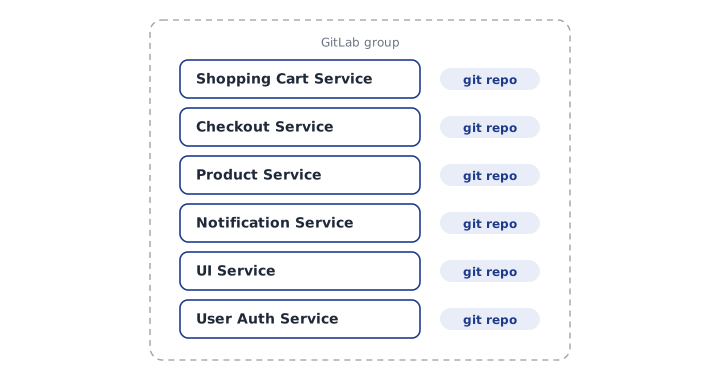
A polyrepo gives each service its own git repo. This is the most common approach for microservices. In GitLab, you can group these repos together so they stay organised.
Advantages
- Each microservice has its own repo.
- Git actions like clone, pull, push and merge are quick and simple.
Disadvantages
- Sharing code and dependencies is harder.
- Debugging across services can be difficult.
- A common change has to be made in each repo separately.
API Gateway
Each microservice has its own context path, like /cart or /product. The API Gateway is the single entry point that routes each API call to the right service.
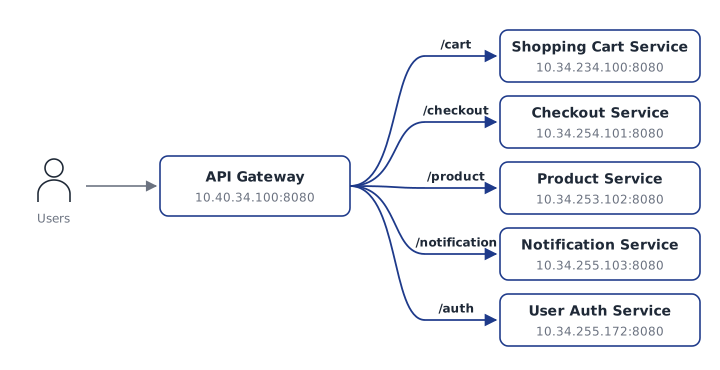
So when a user calls https://my-shopping-website.com/cart, the gateway knows that /cart belongs to the Shopping Cart Service and forwards the request there. The user never needs to know where each service actually runs.
One of the most popular API gateways is Kong. Here's what that routing looks like in Kong's declarative config:
_format_version: "3.0"
services:
  - name: cart-service
    url: http://10.34.234.100:8080
    routes:
      - name: cart
        paths:
          - /cart
        strip_path: false
  - name: product-service
    url: http://10.34.253.102:8080
    routes:
      - name: product
        paths:
          - /product
        strip_path: false
strip_path: false keeps the /cart prefix when forwarding, so the service receives the full context path it expects.
Deployment and infrastructure
Each microservice goes into its own Docker container. Containerising means packaging the application with its libraries and dependencies, everything it needs to run, into one container.
Those containers are then deployed to a Kubernetes cluster. Kubernetes is a container orchestration tool. It starts containers, restarts them when they fail, and scales them up or down.
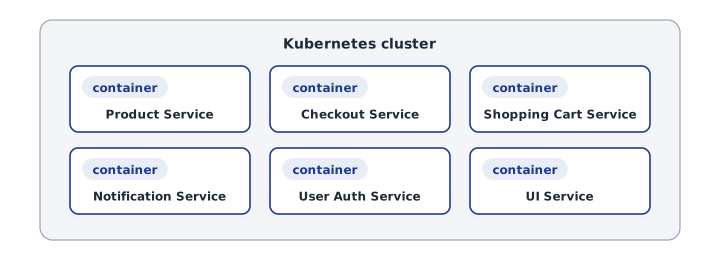
We develop and deploy these services separately, but in the end they all work together as one application for the user.
Wrapping up
- A monolith is one unit: simple to start, hard to scale and change.
- Microservices split an app by business capability, so each part can be built, deployed and scaled on its own.
- Services talk synchronously (HTTP) when they need an answer now, and asynchronously (message broker) when they don't.
- Polyrepo is the common choice for code, and an API Gateway gives users one entry point.
- Docker and Kubernetes run it all in production.
If you're starting a new product, don't jump straight to microservices. Start simple, and split services out when the pain of the monolith is real.